


|
Name |
Sherlock App |
|---|---|
|
Category |
Tools |
|
Developer |
Zachary Yudenfriend |
| Last version | 1.1.1 |
|
Updated |
|
|
Compatible with |
Android 7.1+ |
Table of Contents
1 Information of Sherlock App2 What is Sherlock App APK?3 Main Features of Sherlock App3.1 AI Face Search and Visual Matching3.2 Match Scores, Previews, and Source Links3.3 Search History and Credit-Based Searches4 How Sherlock App Works4.1 Choose and Prepare a Face Photo4.2 Run the Face Search4.3 Review Possible Matches5 Sherlock App APK for Android6 Advantages and Limitations6.1 Where Sherlock Can Be Useful6.2 Things to Keep in Mind
What is Sherlock App APK?
Sherlock App APK is an Android face-search tool designed to help users look for visually similar faces and publicly available online profiles from a photo. Instead of relying on a name or username, the app uses the face in an uploaded image as the starting point for the search.
The basic workflow is straightforward. You choose a photo from your device or take a new picture, position the face, and let the app analyze its visual characteristics. Search results can include profile pages, blogs, news pages, and other publicly indexed web sources where similar images appear.
This approach can be useful when the name behind a photo is unknown or when a user wants to check whether the same image appears elsewhere online. Common situations include reviewing dating profile photos, checking unfamiliar online contacts, identifying reused profile pictures, and looking for copies of your own images.
Sherlock focuses on public online discovery rather than private account access. Results are based on visual similarity, so they should be treated as possible matches rather than automatic confirmation of a person's identity.
Main Features of Sherlock App
AI Face Search and Visual Matching
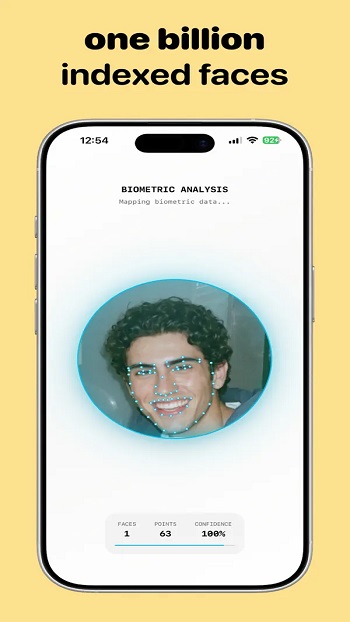
The central feature is face-based searching from a single image. After a face is selected, Sherlock analyzes the photo and searches for visually similar results across supported public web sources.
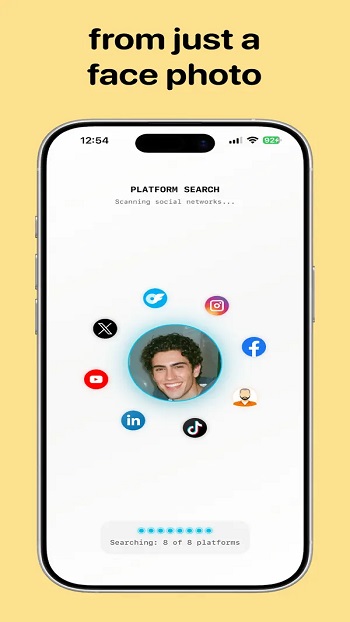
This can be more practical than typing different names into individual social networks, especially when the person uses different usernames or when you only have a photo. Search results are organized so users can review possible matches rather than manually comparing large numbers of unrelated images.
The face-search system is also designed to work with different types of photos. A perfectly centered portrait is useful, but facial matching can still be attempted when the face is photographed from an angle or when part of it is less clearly visible. Image quality still matters, and clearer photos generally provide a better starting point for comparison.
Match Scores, Previews, and Source Links
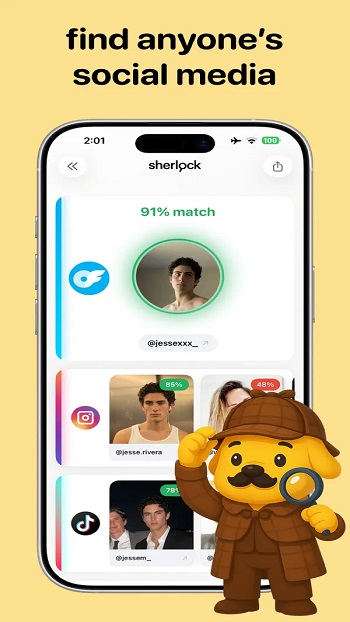
Sherlock presents results with information intended to make comparison easier. Possible matches can include preview images, confidence or similarity scores, and links leading to the public page where the image was found.
These details help users inspect the evidence themselves. A similarity score can help prioritize results, while the source link provides context about where the photo appears. This is important because two people can look similar, and a visual match alone does not establish identity.
The source-based approach is especially useful when checking whether one photo appears across several public pages. Instead of stopping at a single visual result, users can review multiple possible appearances and decide which ones are relevant.
Advertisement
Search History and Credit-Based Searches
The app includes search-history functionality, allowing previous searches to be revisited from the device. This can save time when a user wants to compare a result again instead of starting the same face search from the beginning.
Face searches use credits. Credits may be supplied through subscription plans or additional in-app purchases, depending on the available purchase options. This structure is suitable for occasional verification searches, although frequent users should pay attention to how many searches their available credits cover.
Unused subscription credits may expire, so the credit system is worth considering before choosing a plan. Users who only need a few searches from time to time may value the flexibility differently from someone performing frequent profile checks.
How Sherlock App Works
Choose and Prepare a Face Photo
A search begins by selecting an existing image or taking a new photo. The user then positions or crops the image so Sherlock can focus on the face that should be analyzed.
A clear image with one identifiable face gives the system a more useful visual reference. Very small faces, heavy blur, strong shadows, or major obstructions can reduce how much information is available for matching.
Run the Face Search
After the image is prepared, Sherlock analyzes facial details and compares them with images available through its searchable public sources. The search is designed around facial similarity rather than exact file matching, which makes it different from a basic reverse-image lookup that mainly searches for copies of the same picture.
This means the result set may include different photographs of a visually similar person instead of only identical copies of the uploaded image. That can be useful when researching a public online footprint, but it also means every result needs human review.
Review Possible Matches
Once the search finishes, users can examine the available previews, similarity information, and linked sources. Opening a source page provides additional context that can help determine whether a match is relevant.
Users should compare more than the face itself. Names, usernames, locations mentioned publicly on the page, surrounding photos, and other visible context can help distinguish a useful result from an unrelated lookalike.
Sherlock App APK for Android
Sherlock App APK brings this photo-based search workflow to Android devices, making it convenient to start a search directly from images already stored on a phone. This is useful when a profile photo, screenshot, or received image needs to be checked without first transferring it to a computer.
Advertisement
The mobile interface keeps the process centered on a few steps: select the picture, isolate the face, perform the search, and inspect the returned matches. Direct source links also reduce the need to manually search for each result in a separate browser session.
An internet connection is naturally important for the main search process because Sherlock needs access to online search infrastructure and public web results. The usefulness of each search also depends on what public content is available and indexed. A person with little public online presence may produce fewer relevant results than someone whose photos appear on multiple public pages.
The app can therefore assist with research, but it cannot reveal every account or confirm every identity. Private profiles, restricted pages, content that has not been indexed, and images unavailable to the search system may not appear in the results.
Advantages and Limitations
Where Sherlock Can Be Useful
The biggest practical advantage is reducing the amount of manual searching required when the only starting information is a face photo. Rather than checking websites individually, users can begin with one image and review possible public matches from an organized result screen.
- Check whether a dating profile photo appears elsewhere online.
- Review possible matches for an unfamiliar online contact.
- Look for public pages containing similar face images.
- Find possible instances where your own photo appears online.
- Open public source pages directly from search results.
The combination of face matching, previews, scores, and source links is particularly useful when the goal is verification rather than simple curiosity. It gives users several pieces of information to compare instead of presenting one result as a definitive answer.
Things to Keep in Mind
Face-search results are based on visual similarity and should not be treated as guaranteed identification. Similar-looking people can appear in results, while changes in hairstyle, lighting, image resolution, age, camera angle, or facial obstruction can influence matching quality.
Coverage also depends on publicly accessible and searchable material. Sherlock cannot provide information that is absent from the sources available to its search system, so a search with no useful matches does not prove that a person has no online presence.
The credit system is another practical consideration. Each search consumes available credits, making the app more naturally suited to users who have a clear reason for running face searches. For dating-profile checks, identity research, or occasional public-image searches, that focused workflow can be useful without requiring users to search multiple services manually.
FAQs Sherlock App
What is Sherlock App used for?
+
Sherlock App is used to search for a person’s public online presence by uploading a face photo. It helps with identity checks, dating profile verification, and scam detection.
How does Sherlock App work?
+
The app uses a face image as the starting point, then looks for matching appearances across social media, blogs, video pages, and news websites.
Who should use Sherlock App?
+
It suits people who want to verify someone’s identity online, especially when checking dating profiles, suspicious accounts, or unfamiliar contacts.
Does Sherlock App require a subscription?
+
Sherlock App uses credits for searches. Users can get credits through subscription plans or extra in-app purchases, and unused credits may expire.
What are the main downsides of Sherlock App?
+
The app may feel costly for frequent searches, results depend on photo quality and public data, and it is mainly useful for users who specifically need face-based profile checks.
Discover More Interesting Apps
-
 Mod
Mod
Puffin
v10.6.0.96774
62.16 Mb
Updated -
PDF Editor
v6.3.1
59.92 Mb
Updated -
Latest Mod
v2.0
11 MB
Updated -
Gogone Whats Tools
v2.3
28.71 Mb
Updated -
Mod
CastDuo
v3.0.3
83.43 Mb
Updated -
Mod
Multi App
v2.10.9
52.06 Mb
Updated -
Mod
AI Voice to Text
v1.42
94.91 Mb
Updated -
DexAPK
v1.0
64 MB
Updated -
Mod
PigeonCast
v3.6.2
59.32 Mb
Updated -
Mod Bussid Car Driving
v1.10
35.09 Mb
Updated










Share Your Thoughts